EhBASIC: Inline Assembler/Disassembler & RENUMBER

The first part of this project involved “porting” the “standard” version of EhBASIC so that it would build from source and run as-is on a stock Ben Eater 6502, fixing a couple of issues, adding some features and making its serial terminal respect flow control and implement a ring-buffer.
With that done, I wanted to tackle a couple of additional features that I’d seen asked for a number of times in various places; specifically an “inline assembler” and a “RENUMBER” command. Neither are trivial to build; not necessarily hard either, but with lots of things to take into account, a good number of edge-cases, and, of course, the extra complication of integrating the functionality into a container (EhBASIC) that I a) did not write and b) was likely NOT created with these capabilities in mind.
Why add this to EhBASIC instead of Microsoft BASIC?
EhBASIC is more capable, with very useful constructs such as IF/THEN/ELSE and functional WIDTH/TAB commands, as well as convenience methods such as DEEK/DOKE. As such it is a) a closer match to more expansive dialects of BASIC (making it a good target for porting old programs and b) it was more likely I would do something with EhBASIC rather than just to it.
So, I wanted both the ability to easily add assembly language routines to an EhBASIC program, as well as the convenience of being able to RENUMBER that program when I, inevitably, needed to add code between statements that I no longer had free line numbers for. And, at the same time, provide some previously-requested features to the “community”.
Status
Absent finding issues in the code (a distinct possibility), I have completed this work; the repository is here. v0.7.0 includes both the source archive for that build, as well as an assembled .bin file that can be burned straight to an EEPROM and booted directly on a stock Ben Eater 6502.
Highlights
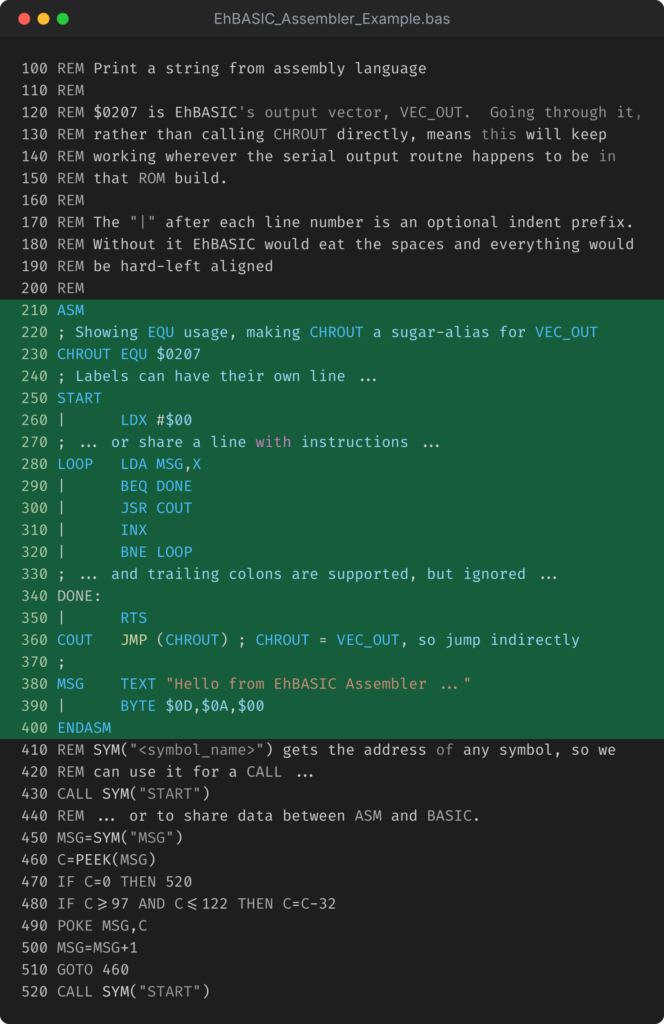
The listing to the left shows most of the functionality of the inline assembler, how it is used within an EhBASIC program and how to exchange data between BASIC and assembly.
The assembly language code (green highlight) is placed between ASM/ENDASM block markers. Line numbers are used, but they exist only to maintain the proper sequence of code for the EhBASIC program structure and LIST behavior.
This routine simply prints the TEXT declared as MSG to the terminal output.
It demonstrates labels, symbols, equates, comments and indenting code.
Following the ASM/ENDASM block is a BASIC routine that first calls the assembly language code. It does this by getting the address of the START symbol, via SYM("START"), and using the EhBASIC CALL keyword to execute code at that address.
When the assembly language code returns, the BASIC code then gets the address of the text, via SYM("MSG"), and mutates it in-place via PEEK/POKE to convert it to all uppercase.
Finally, the BASIC code calls the assembly routine again, and that prints the newly altered TEXT data, showing how data declared within the assembly code can be accessed and changed from BASIC.
Full details of the capabilities of the assembler, it’s attendant disassembler, and the RENUMBER command, including both the how’s and, perhaps more interestingly, the “why’s” of the implementation and design decisions that drove it comprise the remainder of this blog entry:
Inline Assembler
Let’s start by defining what “we” mean, here, by “inline” assembler.
Assembly language code can be placed inline with other BASIC statements, expressed as “BASIC” lines of code (with line numbers to keep the ordering for the interpreter and LIST functions), so it is located “in context with” the BASIC code that will call it.
During program execution, when the interpreter encounters an ASM command (ASM/ENDASM block), if it has not already been manually, or programmatically triggered, the assembler will assemble all of the assembly code blocks in the program.
However, the assembly code does not run inline with the BASIC code. It must be explicitly called (via CALL) to actually run.
Labels & Symbols
Label and symbol names are significant up to 8 characters and are visible across all code blocks, so can be referenced from any ASM/ENDASM code block.
For LABELS, a trailing : is allowed but will but is not required and will be ignored. This is simply increase the scope of compatibility if using assembly code copied from elsewhere.
LABELs can live on their own line or share a line with an instruction (which they must precede). Their address can be retrieved with the SYM("name") function in BASIC.
Operands
Operands follow common 6502 assembler conventions, per the table below:
| Operand/Form | Meaning |
$1F $1234 | Hex |
%10101010 | Binary |
65 | Decimal |
'A' | A single character |
LABEL LABEL+2 | A Label, with an optional offset |
* | Address of the instruction being assembled |
<LABEL >LABEL | Low or High byte of the label/symbol |
Note that you cannot use BASIC expressions for labels/offsets/addresses1! There is no precedence and no arithmetic beyond the optional single offset, thus LDA #VAL*2 is a syntax error, not a multiplication.
Directives
A basic set of directives are implemented for including data, reserving space, assigning values to SYMBOLS and specifying the memory location for assembly.
The assembly location does not need to be specified, but you can override it. Once overridden, the assembler will just keep working from that address, incrementing as needed for the code that follows.
If you want to reference data or reserved space from within BASIC, place a label immediately before the directive that defines/declares that data/space and then resolve its address as runtime with the SYM("name") function.
| Directive | Purpose |
BYTE n[,n...] | Emits bytes |
WORD n[,n...] | Emits 16-bit words, low byte first |
TEXT "..." | Emits the quoted ASCI-II characters, exactly as typed |
NAME EQU n | Gives a SYMBOL (name) a value |
DS n | Reserves n bytes; emits nothing |
ORG n / *=n | Assemble at this fixed address from this point on |
Program Entry, Listing and Indenting
Code is entered, with a line number, with one instruction per line:
# [|] [label] [mnemonic | directive [operand]] [; comment]A label is any first field that is not a mnemonic or a directive. A trailing : on a label is accepted and ignored. Lower case outside of quotes is folded up, so lda #$41 is fine, but text inside quotes is left exactly as typed.
Indenting with |
EhBASIC removes/ignores spaces between a line number and the first non-whitespace character before it stores the line, so 120 BEQ DONE is stored, and comes back from LIST, as 120 BEQ DONE. Anything non-blank at that position stops the skipping, so the optional | prefix is provided to allow indenting ASM code. The two code examples below show the behavior when typing indented code without the | prefix, and how it will come back from a listing:
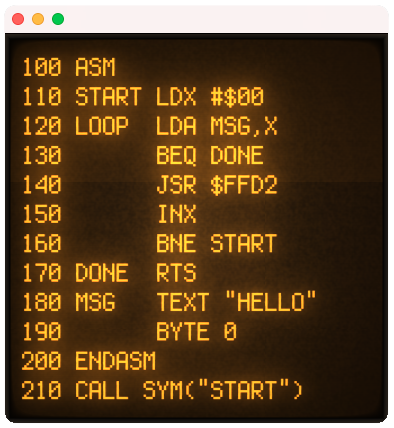
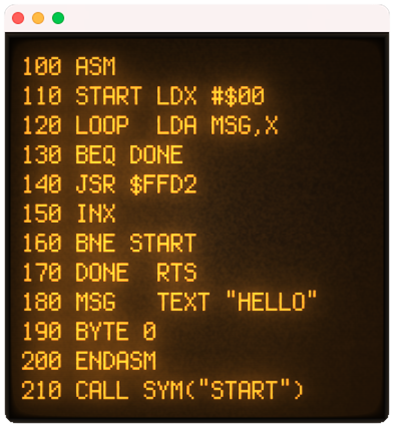
LIST Returns ItA label can share the margin, as |LOOP and |DONE do above, so labels and code line up on the same column. A line that is nothing but |, or | followed by a comment, is simply blank.
| was picked because it has no meaning anywhere else: the tokenizer copies it straight through so it costs no token, no 6502 assembler uses it, and outside an ASM block it is a syntax error — which is what a stray one should be. It only has any effect as the first non-space character of a line inside an ASM/ENDASM block.
When indenting the | character is only required if it is the first character after the line number and the separating space. You can choose to prefix EVERY line with | or only use it where necessary:
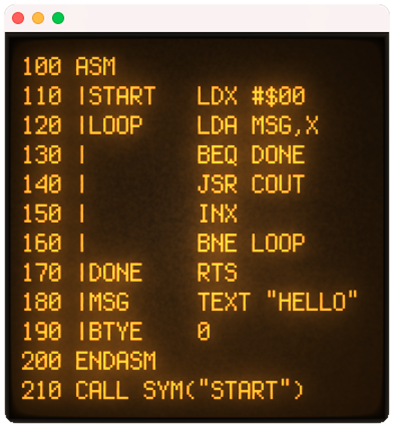
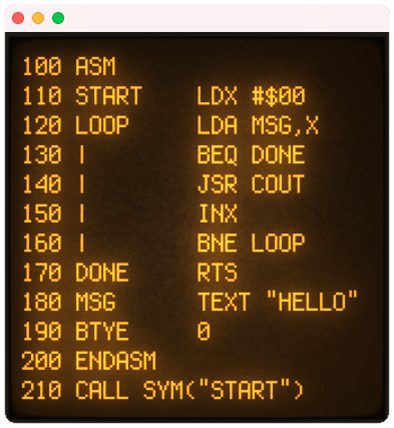
Note: Since each indent space is counted as a character, and takes up a byte of program storage (RAM), if memory is tight use fewer spaces on the indent and consider putting labels on their own lines.
Architecture & Design Decisions
Building a simple, 2-pass (to support forward-references), assembler that does not implement macros, conditional behavior, expression evaluation, nor other features common to dedicated assemblers, is not especially taxing.
Effectively it just needs to parse the text of the code, calculate memory locations for instructions as it encodes the parsed and translated text, log SYMBOL locations and then emit the code to a specific memory location.
When implementing an inline assembler, that operates within an existing “outer” language, as is the case here, there are lot more considerations. Identifying the key architectural issues (things that will either be expensive to change, or dramatically affect complexity) was one major element of this project, and then designing and solving for them was the other.
My two overriding architectural principle here were:
- Avoid changing any of EhBASIC’s internal behavior wherever possible.
- Use existing EhBASIC mechanisms whenever possible.
Assembly Code Blocks
The original question here was, “How to represent or denote the assembly language vs. BASIC?”
It was easiest to have specific markers in the code, as actual BASIC keywords, to denote the start and end of assembly language code blocks. A useful side effect of this was the ability to have multiple such blocks with no additional work.
But what goes inside each block?
Line Numbers for Assembly Code
Typically, assemblers don’t use line numbers (though the original Atari 8-bit “Assembler/Editor” cartridge did, as I recall).
Having line numbers for each line of code within, and including, the ASM/ENDASM keywords (block delimiter), means the existing parser and code storage mechanisms can be used unchanged.
Code order is preserved, LIST works as expected, and lines of code can be added/removed/edited in the same manner as any other line of BASIC code.
Line Numbers vs. LABELS – Branch, Jump and JSR Target Addresses
Should these be resolved based on the line numbers, since I already had decided that was how the code was going to be maintained within EhBASIC?
I tried it; it was simple but unnatural.
I felt it was worth the additional work to use the more traditional SYMBOL/LABEL model for these targets. This also provided a way to look up addresses of data and code in the assembly language blocks from within BASIC.
SYMBOLS/LABELS are in a single scope; this means that they are visible to all inline assembly code, across code blocks! This makes it trivial for blocks to share data, as well as allowing for much simpler symbol/label handling!
The address of a SYMBOL or LABEL can be retrieved in BASIC using the new SYM(“name”) function. Once you have such an address, you can use PEEK/POKE/DEEK/DOKE to read/write to it from BASIC, allowing easy data exchange between BASIC and assembly code.
Where does the Assembled Code Live?
By default, the code is assembled into a block at the top of RAM. It’s sized and allocated as part of the assembler’s first pass. EMEML is adjusted down accordingly.
If you want to know the address of that, at runtime, you can put a SYMBOL at the start of the code and use the new function SYM(“name”) to get its address. That works for any symbol, at any time.
String storage then lives below that.
One side-effect of this approach is that if you change the assembly code it will clear out the allocated strings the next time it does an assembler pass, since the size of the code image can change.
This has implications for how/when code is assembled!
You can use an ORG addr or *=addr directive if you want. If you do, you take over what lives where for code and reserved space from that point on. Which, if you don’t need to make additional changes to where things are assembled, involves no extra work – everything will wind up in one contiguous block.
Lazy & On-Demand Assembly
When to perform assembly was an early conundrum.
Should I assemble all blocks upon RUN or just when first encountered? And if it is when an ASM/ENDASM block is first encountered, should it just be that block or everything?
This was mostly answered in the solution for “Where does the assembled code live”? The implications of erasing string storage meant that you really didn’t want to keep running assembly functions and changing the location of things in memory.
So …
Assembly is lazy by default; it doesn’t occur until the first ASM/ENDASM block is encountered, and then all of the code is assembled. The original intent of that was as a first step to allowing the use of EhBASIC’s normal IF/THEN constructs to facilitate conditional assembly2.
So, if you set up a bunch of string variables and then run into an ASM/ENDASM block, they’ll get wiped. The fix for that is just to put the command ASSEMBLE at the top of your code.
You can also issue ASSEMBLE as a direct/immediate command, which will compile all assembly code blocks and, optionally, output a listing, including address and byte values (as per the disassembler).
Zero Page References
A SYMBOLIC or LABEL operand always assembles as absolute (2 bytes) unless you put < in front of it.
Thus, LDA PTR is three bytes even when PTR is $80; LDA <PTR is the two byte zero page form.
That is not an oversight, but an artifact of keeping things as simple as possible in the implementation. The width of an instruction has to be the same in both passes, or either every address after it shifts or address layout and computation has to vary by opcode, and for every opcode:
On pass one, a forward-reference has no value (yet), so the only reasonable rule is to decide the width from how the operand is written rather than from what it turns out to be. Literals narrow on their own — LDA $80 is zero page, LDA $0080 is absolute, exactly as written — but for a symbol < is the syntax for indicating that. It is, perhaps, a bit of an adjustment from other, full-fledged assemblers, but here the two meanings coincide, and yield a useful simplification in implementation.
But, regardless … for something that lives in zero page, its low byte is its address.
Disassembler
A natural complement to an inline assembler is a disassembler. In this case it serves several purposes; the first being to ensure that the (initially) experimental inline assembler is generating the correct, consistent output, without having to do manual dumps via WozMon and disassembler them externally. The second, allowing disassembly of other routines in ROM, RAM or code that embeds machine code routines via DATA statements and POKEs/DOKEs
Usage
DASM start[,count] prints a disassembly starting at the memory location start and continuing for count instructions.
The memory location can be anywhere, including both RAM and ROM, so you can easily disassembly both inline (RAM-based) code, as well as EhBASIC or WozMon.
Syntax:
DASM start[,count]
where:
- start – is the memory address to being disassembly from
- count – is the optional (default 20) number of instruction to disassemble
Example
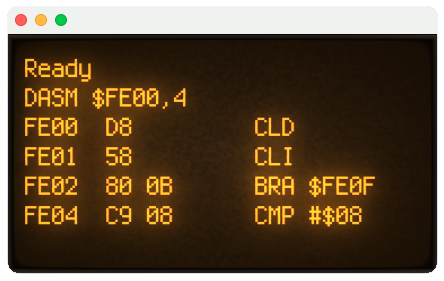
The example below shows the disassembly of the first 4 instructions of WozMon.
Each line is prefixed with both the address of the first byte of the instruction and the 1-3 bytes that encode it:
RENUMBER
It was in the early 1980s that I last wrote real code in BASIC where line numbers were required. Anything I’d touched since, be it Visual BASIC or TI BASIC (for their various calculators), line numbers were a distant memory.
In an earlier project, where I ported “101 BASIC Computer Games” to Microsoft BASIC, the need to work around missing features from the original BASIC dialects used made me really wish for a RENUMBER capability (in the end, I added subroutines to move code that needed more line-space than was available out of the main code path).
And on the 6502.org EhBASIC forum it was one of the more frequently requested features.
So, I decided to tackle implementing it here.
Usage
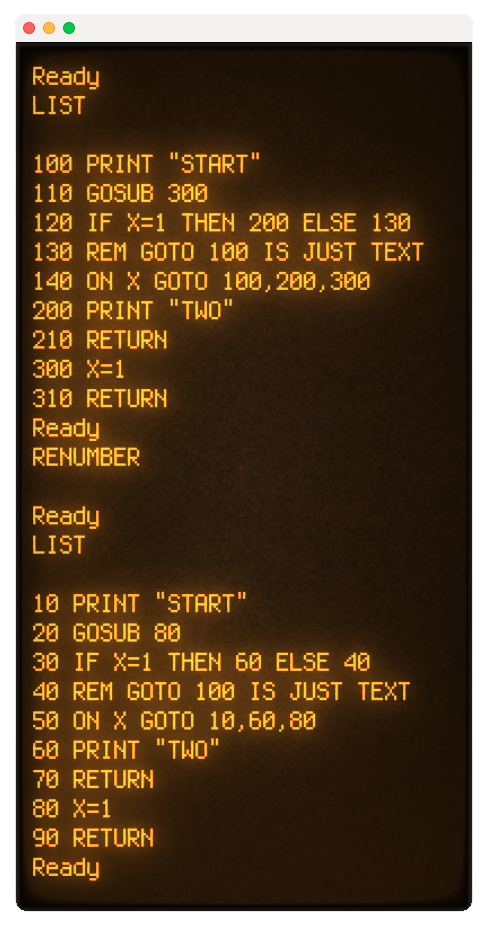
RENUMBER renumbers the stored program and fixes up every line number it refers to, so the program still runs afterwards.
Syntax:
RENUMBER [new[,inc[,old]]]
where:
- new – is the new line number for the FIRST line of code after renumbering
- inc – is the number to increment each line number by
- old – is the line number in the original code to being renumbering from
new and inc default to 10, and old defaults to the start of the program.
Thus:
RENUMBER
Will give you lines 10, 20, 30, etc.
Line numbers are updated for GOTO, GOSUB, THEN, ELSE, RUN, RESTORE and LIST, and through the comma list of an ON GOTO or ON GOSUB.
If there is insufficient memory for RENUMBER to complete, then it does nothing.
Implementation Approach
My first attempt was a 2-pass affair, required a decent chunk of available RAM to function, and missed a number of edge-cases. It worked on some programs, and failed on others. I wasn’t super surprised when it couldn’t properly renumber SPCWAR.BAS, but I was when it failed on a couple of much smaller (150-200 lines) programs.
I fiddled with that for a bit … and then figured I’d apply some AI-assistance to see about “getting it done”. This is one of those cases where I was more interested in having the feature available than in doing the implementation of it, even though I definitely wanted to take a stab at it.
The goal, after all was, to get to a point where a couple of programs I wanted to write for these BE6502 computers were more practical/less frustrating.
Four Passes – What & Why
There are two forms line numbers take in an EhBASIC program:
- The line “header” – The number for the actual line of code These are always stored as simple numbers using two bytes, valid from 1 to 64,000.
- Line number references – For GOTO, GOSUB, and any other line number reference; these are stored as plain TEXT strings and are decoded to actual numbers during execution.
The length of these numbers **shrinks** _or_ **grows** with the line number. A two digit number takes two bytes, a five digit number takes five bytes.
The variation in line numbers lengths means things have to be moved “up” in memory to make space if line numbers get longer, and “down” if they get shorter. Doing this in two passes is possible, but the code is very fiddly and it winds up moving the same memory blocks multiple times (albeit, a smaller set of blocks each time), so is much slower than it needs to be.
The four-pass approach simplifies the implementation, effectively using the same parsing/processing code, with a flag to indicate which operation it should perform on that code-walk:
Pass 1: “Measure”
Determine how much additional space is required by making every line number reference five digits/bytes long. This adds as many as four characters/bytes of storage requirement to each referenced line.
Pass 2: “Widen”
Grab the required additional space and then shift the code “up” into it, then padding every line number reference out to five characters/bytes.
Pass 3: “Map”
No code moves here. Each five character/byte line number references is read, the new number line number is looked up (against the unchanged line header values), and written into the padded number.
Pass 4: “Trim & Update”
Finally, copy the padded code back down, removing the padding as we go, and updating the new numbers into the line headers.
A final step is to rebuild the “next line” chain so EhBASIC can still use it.
Using/Porting these Features with other EhBASIC Builds
The inline assembler, disassembler, and RENUMBER command implementations are not, in anyway, specific to my port of EhBASIC for a stock BE6502. They were deliberately built in such a way they could be added to another port/build with minimal efforts.
Using the Inline Assembler & Disassembler with other EhBASICs
For the assembler/disassembler, the following files contain all of the principal implementation, excepting the addition of the custom commands and their integration into the EhBASIC token table:
- assembler.s
- custom_commands.s
- disasm.s
- opcodes.s
And then the token table updates are found in:
- basic.s
ALL of the salient code is gated via a pair of SYMBOL definitions, which default to DEFINED (per the makefile). So, moving the assembler/disassembler to your own version of EhBASIC involves adding four main files and extracting the ASM/ASM\_ENABLE/ASM\_BUILT gated conditional assembly elements from basic.s and moving them to your own project.
The ASM\_CPU SYMBOL determines which 6502 instruction set is used:
- 0 – NMOS 6502; the original 151 opcodes
- 1 – 65C02 core – adds BRA, PHX/PHY/PLX/PLY, STZ, TRB/TSB, INC A/DEC A, BIT #imm, BIT zp,X, BIT abs,X, JMP (abs,X) and the (zp) modes; 178 opcodes
- 2 – Full WDC W65C02S – adds RMB0-7, SMB0-7, BBR0-7, BBS0-7, WAI, STP; 212 opcodes
Using the RENUMBER command with other EhBASICs
All of the operational code here is contained in the custom\_commands.s file, with just the token table additions/vectors present in basic.s.
Unlike the assembler/disassembler code, the RENUMBER command is not an optional part of the build; as such there is no gating around the elements required to make it work. However, it resides as a contiguous implementation in custom\_commands.s and then the single custom token addition in basic.s, so extracting it is simple.
AI Usage
As I’ve mentioned before, I rarely use AI for my retro-programming projects. Doing so takes away much of the reason that I’m working on them in the first place; nostalgia. The coding piece is often as, and sometimes more, enjoyable and involving than the end-result.
It isn’t an ethical objection.
It is usually focused on understanding a larger, foreign, codebase.
But I’ve made some definite exceptions with my to-date EhBASIC “work”; specifically in porting EhBASIC to the stock Ben Eater 6502, and then adding some fixes and features to add WozMon to the ROM and to bring it to parity with my earlier modifications to Microsoft BASIC.
In adding both an inline-assembler and a disassembler, as well as implementing a proper edge-case-catching RENUMBER command, I’ve made non-trivial use of AI (Claude Code, Opus 5), specifically:
- Efficiently building an opcode/mnemonic representation, to minimize the required ROM space, and in a form that it could be shared by assembler and disassembler.
- This includes options for a “pure” original 6502 instruction set, all the way through a full set of WDC 65C02S instructions.
- EhBASIC custom-command integration.
- Designing the memory/layout behavior and implementing the symbol/string processing code during assembly.
- Adding detailed block-level code comments, particularly for cross-file dependencies and behaviors.
- Adapting my first, 2-pass, implementation of the RENUMBER function to a 4-pass approach that uses significantly less memory (so can be used on larger programs) and covers some edge-cases I was not cleanly handling.
These are all things I could have done myself; AI assistance just made it take much less time and, as such, meant it actually got done before I lost interest.