
EhBASIC for the Ben Eater 6502 Breadboard Computer

What is this?
An as-is buildable-from-source/burnable/runnable version of Lee Davidson’s “EhBASIC”, based on Klaus Dormann’s patched version of EhBASIC v2.22, targeted at the stock Ben Eater 6502 breadboard computer (herein “BE6502”).
It builds with the cc65/ca65/ld65 toolchain, and generates a ready-to-run 32KB ROM image.
TL;DR; or Take me to the Code
Now you know what this project is about, if you want to skip all the details and just get to the code you will find it on my GitHub, under EhBASIC for the Ben Eater 6502.
Motivation
After modifying the build of Microsoft BASIC from Ben’s original videos (adding an extended TOKEN table and various LCD control commands, as giving it proper BACKSPACE support), I ported ALL of the programs from the classic “101 BASIC Computer Games” to run on it.
A number of those ports were complicated by features present in the original dialects of BASIC from the book, vs. the comparatively limited capabilities of Microsoft BASIC v1.1. And that got me thinking about how different the porting process would have been if the BASIC I was targeting had constructs such as IF/THEN/ELSE (among others).
Some time on the 6502.org forums, in particular the EhBASIC section, made it apparent that that was likely the best route to go for a more capable BASIC dialect.
I was “hoping” to find a ready-to-run version of EhBASIC for the BE6502. And I did, but they weren’t buildable as such from source (at least not as-is). And the versions that were properly buildable from source did not, natively, run on a stock BE6502.
This was a particular problem as, even the versions I could just burn-and-run, did not implement any kind of serial flow-control or buffering. It meant pasting code into the interpreter had to be done with terminal pacing controls; and the longer the program the slower that pacing has to be – to the point it was glacially slow for even moderately sized programs; something I very much wanted to fix if I was going to “use” EhBASIC for anything …
… such as this port from my Microsoft BASIC port of spcwar (Star Trek) re-ported for this version of EhBASIC:
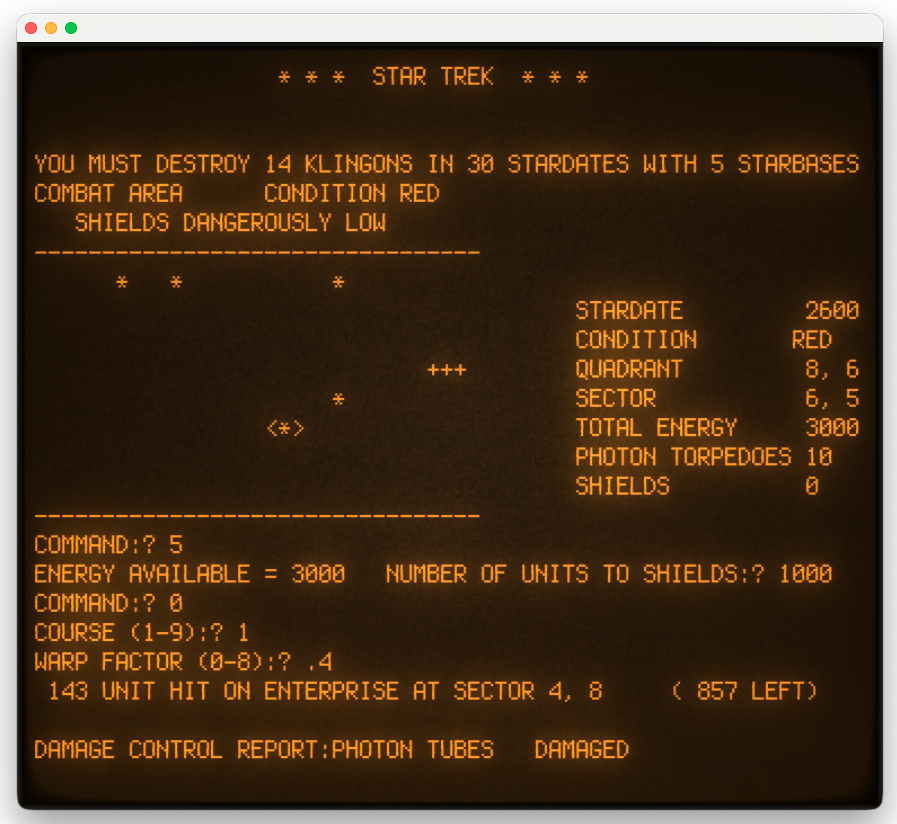
So … I decided to “create” such a beast myself … as a starting point for various fixes and enhancements:
Enhancements/Additions & Fixes
Serial Flow Control & Input Buffering
This was the issue I was most interested in fixing, as mentioned above. The “raw” port (v0.0.1), which is just the desired native build with no fixes or enhancements, required terminal input pacing (0.6s line pacing, 0.02s character pacing).
This uses the input (ring) buffer from Ben’s build that a) fixes the 65C51 UART bug and b) requires running a connection from PA0 on the 65C22 VIA to the CTS pin on the serial connector (via the MAX232 charge-pump/level shifter)
While making these changes, I ran into an issue with IRQ service routines (which I think is similar to this find) that can cause various problems, including outright crashing/restarting, so that fix is included here, also.
“Proper” BACKSPACE Support
The standard behavior, on default terminal settings, is that BACKSPACE does not erase the character it backspaces over. This is annoying in use. So v0.2.0 fixes that. The visual, and in-editor, behavior of BACKSPACE now matches what I expect.
Include WozMon in ROM w/ EhBASIC Entry/Reentry
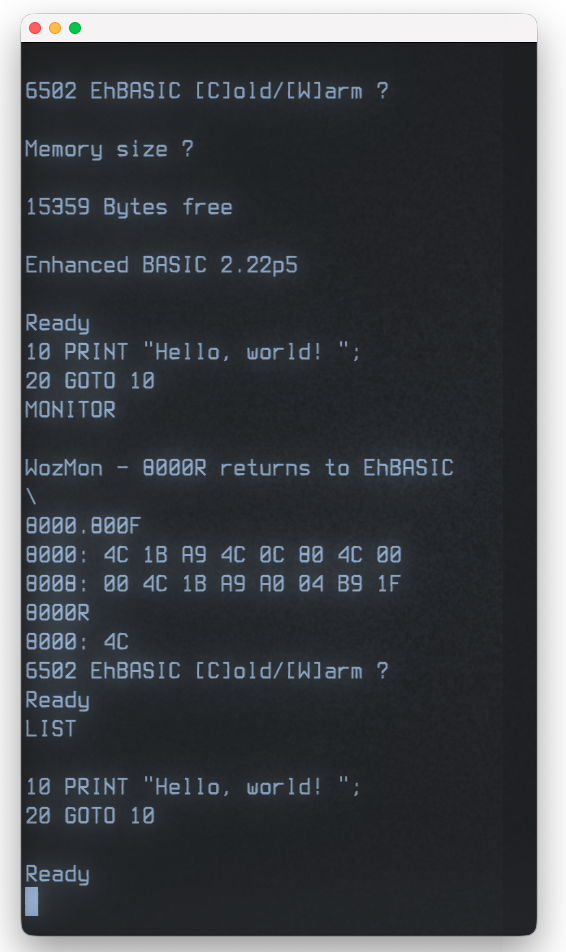
WozMon is now included in the ROM build (v0.3.0 and later), something I find useful on these builds in general, and especially so given EhBASIC’s ability to be Warm started (be “relaunched” while retaining its current program/state).
The ROM boots into EhBASIC, but WozMon can be invoked from EhBASIC by executing MONITOR in direct/immediate mode, or on a program line. Return to EhBASIC is achieved by executing 8000R in WozMon (it will prompt for this when MONITOR is used).
If you wish to retain your current EhBASIC program, choose Warm start when you return to it.
The screen capture, to the left, shows:
- Booting into EhBASIC (cold start)
- Entering a short program
- Running WozMon
- Listing some memory addresses
- Returning to EhBASIC (warm start)
- LISTing the program that was originally entered.
Fixed Type-Ahead Characters Being Dropped
Corrects an issue in which EhBASIC would drop characters typed-ahead. This caused problems with line entry after direct/immediate commands, as well as general type-ahead issues.
Runtime Diagnostics for Address-Line Shifting/Splitting
With all the above fixes in place, I was working on porting/testing some larger programs (e.g., “spcwar” (Star Trek)) and ran into a sporadic issue with line numbers and command code randomly getting corrupted, causing the program to fail.
I spent hours trying to track this one down, convinced it was a software issue, and eventually turned to using AI to assist (it built these diagnostics and, to my surprise, identified the root cause of the issues).
It turns out not to be a software problem.
When using a picoROM (EEPROM “emulator”), on this breadboard build, there’s a potential for increased capacitance and load on the address lines, which manifests itself as the address line not updating quickly enough and splitting part of an two-byte address decode being split on unsettled/indeterminate line levels, resulting in the line being read incorrectly – and that changes the address.
In this case it was A10 and A11 being affected.
This was ultimately confirmed using these conditionally-included (omitted by default; see README.md) diagnostics, in v0.3.2, with a picoROM and then again with an actual AT28C256.
Note: This is not an issue with the picoROM itself; it’s the combination of factors including wiring length/path, being on a breadboard, and so on!
Custom LCD Commands
This release (v0.4.0) adds custom LCD keywords for manipulating an HD44780 (or M68) based LCD, LED or VFD display. They are conditionally compiled, since the LCD initialization can hang a BE6502 if either the LCD isn’t connected OR it is wired in 8-bit mode.
Running make will include the LCD commands by default; run make LCD=0 to exclude these extensions.
The included binary (basic.bin), in the linked release, has the LCD commands enabled.
Examples & Usage
These commands work the same way as those in my Microsoft BASIC build. I wrote a blog post on how to use them, here, which includes a sample program that will run-as in this version of EhBASIC.
Building the Project
Part of the point of this project is to make this simple and repeatable:
- Ensure you have the cc65/ca65 tool chain installed (v2.19) and available on your path
- Download the code, or clone the repository
- Run
make(ormake LCD=0if you do not have the LCD on your build/it isn’t setup for 4-bit mode) - Program your EEPROM with the ROM image that will be built as
bin/basic.bin
Use of AI – What/Where and Why?
I rarely use AI for my retro-programming projects. When I do, it tends to be sparing and focused on understanding foreign code vs. writing new code. It’s not an ethnical thing; I just don’t want to delegate the fun part of retro-programming to AI, as that defeats the point of doing it (for me).
This project is something of an exception.
In part, this is because my focus here was on having a working implementation not the process of getting there. I didn’t grow up with EhBASIC, I have no attachment to it nor nostalgia for it. If I had found a suitable build-and-run as-is version of EhBASIC that worked on the stock BE6502, I wouldn’t have done any of this and would just have used that.
So … AI (Claude Code w/ Opus 5) was used here for:
- Understanding/mapping some of the control flow and usage of zero-page locations
- Tweaking/adapting parts of WozMon
- Finding, and fixing, the loss of (some) characters when typing ahead
- Porting-in my original LCD custom commands from my version of Microsoft BASIC
- Implementing the entire diagnostic “sentinel” and “debug” options
- Expanding code comments (mostly how/why) around some of my changes
- Re-organizing the Makefile with the various build options
- Generating the parts of the README.md that relate to the AI-generated code.
What’s Next?
There are no, specific, additional enhancements I have planned for EhBASIC. Though, I am casually thinking about implementing a simple in-line assembler. We’ll have to see on that.
Part of why I considered using EhBASIC was to explore (re)porting “101 BASIC Computer Games” to EhBASIC. If I do, it a) won’t be as focused an effort as my original ports to Microsoft BASIC and b) I very likely will not do it as manually (about 95% of that porting effort was done by hand, without any AI assistance).
One big consideration there is that part of the original porting effort involved a considerable number of corrections to the OCR/transcribed source material, which was necessary prior to the actual code-porting work.
I have no desire to repeat that part.
And, it has obviously been done as part of my original ports; however, it is entwined with the porting-deltas themselves.
Thus the consideration is to re-port from the original transcriptions I based my port on vs. using my existing ports as the baseline.
If I use my ports as the baseline, I’m not going to be taking advantage of the enhanced features of EhBASIC; it’ll just be minor syntax and parameter adjustments (e.g., the meanings of RND(0) and RND(1) are inverted between MS-BASIC and EhBASIC). It may well be doable with a simple script that make certain, predetermined, substitutions/changes.
If I don’t use mine as the baseline … I have to re-do all the transcription fixes.
We’ll see …
[…] first part of this project involved “porting” the “standard” version of EhBASIC so that it would build […]